OpenAI Launches Dots, Always-On Agents Powered by GPT-6 Astra


OpenAI launched dots at DevDay on September 29, 2026: always-on personal agents, powered by GPT‑6 Astra, that run on their own cloud computers and keep working on your goals when you aren’t in the chat. OpenAI calls them “remarkably capable, always-on agents built to handle everything.” The pitch is a change of interaction model. You give a dot standing goals, and it works in the background and comes back with finished work, sometimes, OpenAI says, “before you even think to ask.”
General Audience


What a Dot Is
Each dot has its own cloud computer, its own browser, and access to whichever apps you connect. OpenAI says its plugin ecosystem covers more than 4,000 apps. You can open the dot’s computer at any time to see what it is doing. You can also let it connect to your own laptop and work there. A dot can run several projects at once, so you add tasks without managing separate threads.
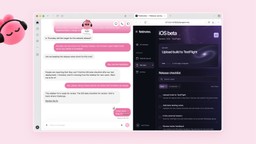
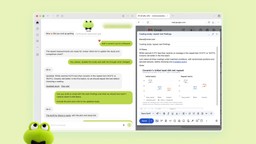
Dots are reachable in ChatGPT on desktop, web, and mobile, and also in Slack and Microsoft Teams. OpenAI says texting is “coming soon.” Context carries across these channels. You can start a project in ChatGPT and continue it from a Slack thread, or start a voice call with the dot. Each dot has a cartoon persona that you name yourself. OpenAI’s examples include a pink dot called Iggy and a green one called Todd. TechCrunch described the design as “bubbly” and compared it to Meta’s recently released Muse agent.
OpenAI’s example use cases are all long-running jobs. A dot watches customer feedback and opens tested pull requests, with videos of the changes attached. It reruns a scientist’s analyses when new data arrives and updates the figures. It revises launch materials when a product’s scope changes. Inside OpenAI, the company says, dots start investigating when a bug is reported in Slack. In one example from an outside early tester, the dot noticed a forgotten invoice, prepared it, and sent it once the user approved.
Guardrails and Permissions
Because dots act without being prompted, most of the announcement covers the controls around them:
- Isolation. A dot works on its own cloud machine, and your computer stays separate unless you connect it. Dots can sign in to supported sites with saved passwords without the model seeing those passwords.
- Read-only “proactive research.” When you are not working with it, a dot looks for ways to help, but only through read-only tools. It cannot send messages, change app content, or control a browser or computer while doing this.
- Custom Rules and auto-review. Dots come with default rules for when to act alone and when to ask. You can allow, require approval for, or block specific actions. An auto-review step checks actions that affect your accounts or share information, and some tasks, such as changing a password, always stay with the user.
- Monitoring. A safety monitor can pause or stop a dot’s work. Activity View shows what the dot is doing, including background work.
- Data use. OpenAI says it does not train by default on Business, Enterprise, or Edu workspace content. It also says it does not train directly on proactive research or on a dot’s notes to itself.
OpenAI also says: “Dots can still make mistakes, so always review consequential work.”
Availability
Dots are rolling out in ChatGPT to Pro and Business Premium subscribers in eligible markets. For Enterprise, Edu, and Healthcare workspaces, the beta has to be enabled by an admin. According to TechCrunch, the eligible markets for Pro do not include the European Economic Area, Switzerland, or the UK. One dot is included in the plan at no extra cost, and OpenAI says users will be able to add more dots and buy more speed or monthly capacity later. Chatting with a dot doesn’t count toward ChatGPT usage limits, but tasks the dot starts in Codex or ChatGPT Work do. You create a dot in the ChatGPT desktop app or a desktop browser. After that, you can message it from mobile.
OpenAI also previewed specialist dots for organisations. These dots have their own identity, credentials, IT-provisioned hardware, and connections to company systems of record. They are meant for defined roles, and OpenAI names procurement, invoice processing, and customer support as examples. They will start as enterprise pilots, and OpenAI is working with Microsoft to bring them under the governance controls in Microsoft Agent 365.
What This Means
Dots move ChatGPT from answering requests to acting on standing goals, and OpenAI’s controls are designed around that. Background work is limited to read-only tools. Anything that changes an account or shares information goes through rules and review. Each dot has its own machine and, in the enterprise version, its own identity. Together these limit what a dot can do on its own.
How well these controls work will depend on setup. Any agent connected to 4,000 apps is exposed to prompt injection through the content it reads. The approval model also relies on users reviewing what they approve rather than waving it through. The GPT‑6 Astra model behind dots is also the first model OpenAI rated “Critical” for cybersecurity capability. For universities, where staff, researchers, and students may connect dots to email, drive storage, and research data, the Edu admin toggle and Custom Rules will be the main governance tools.
Related Coverage
- OpenAI Launches GPT-6 Astra, Its First ‘Critical’ Cyber Model: the model that powers dots
- OpenAI Releases GPT-6 Sol and Luna at Half the Price: the rest of the GPT‑6 family, released September 22
This post was drafted with AI assistance and reviewed by RITS staff.


 沪公网安备31011502017015号