Anthropic Ships Agent View: A Multi-Session Dashboard for Claude Code


Anthropic has shipped Agent View, a research preview that turns Claude Code into a multi-session command center. Launched on May 11, 2026 and available in Claude Code v2.1.139 or later, the new claude agents view lets developers dispatch, monitor, and reply to many parallel coding sessions from a single screen — without keeping a terminal attached to any of them.
Intermediate
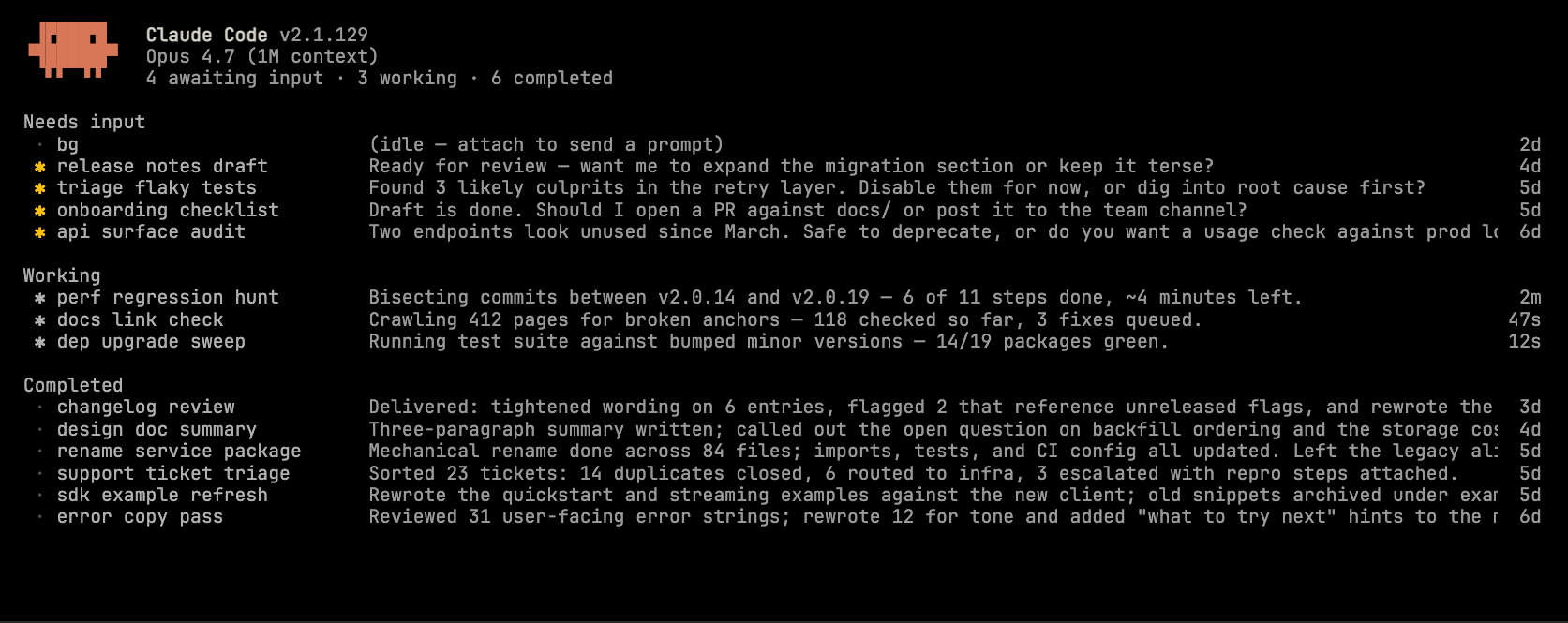
One screen for every session
Agent View opens with claude agents and replaces the terminal with a table of every background session on the machine — regardless of which project or worktree it started in. Rows are grouped by state: Needs input and Ready for review bubble to the top, followed by Working and Completed. Each row carries a one-line summary of what Claude is doing, what it needs, or what it produced, generated by a configured Haiku-class model and refreshed at most once every 15 seconds.
The state icons encode two signals at once. The colour shows the session’s status (animated for working, yellow for blocked, green for completed, red for failed). The icon’s shape shows whether the underlying process is still alive — a hollow dot means the supervisor has paged the session out, but you can still peek, reply, or attach to wake it back up from where it left off.
Peek, reply, attach
The interaction model is built around minimum intervention. Pressing Space on a selected row opens a peek panel showing the session’s recent output and any blocking question; you can type a reply and hit Enter without ever leaving the table. For multiple-choice prompts the peek panel surfaces the options so you can press a number key. Pressing Enter or → attaches to the full session, which behaves identically to a regular claude invocation; pressing ← on an empty prompt detaches and returns to the table.

Dispatching is symmetrical. Typing a prompt into the input at the bottom of agent view spawns a new background session; prefixing with a subagent name routes the task to that agent, while @<repo> targets a sibling repository and /<skill> launches a packaged skill. From inside an existing interactive session, /bg backgrounds it; from the shell, claude --bg "<prompt>" starts a session that goes straight to detached mode.
How background sessions are hosted
The mechanics are worth understanding because they differ from subagents and worktrees. Background sessions are managed by a per-user supervisor process that starts automatically the first time you background a session or open agent view. Each session is its own Claude Code process parented to the supervisor rather than to your terminal, so closing the shell, restarting agent view, or letting the auto-updater swap the binary all leave the work running.
To prevent parallel sessions from clobbering each other, Claude automatically moves any background session that needs to write files into an isolated git worktree under .claude/worktrees/. Sessions can read the same checkout but each writes to its own branch — and the worktree is removed when the session is deleted, so merging or pushing changes is a prerequisite to cleanup. State is persisted to ~/.claude/jobs/<id>/state.json, and a roster file lets the supervisor reconnect to detached processes after a restart.
Session quotas are not shared. Each background session consumes subscription usage independently, so a fan-out of ten parallel agents burns through rate limits roughly ten times faster than a single interactive session. Sleep or shutdown stops every running session; claude respawn --all brings them back from disk.
What this means
Agent View is positioned alongside Anthropic’s other parallelism primitives — subagents, agent teams, skills, hooks, scheduled prompts, and Claude Code on the web — but it occupies a different niche. Subagents are specialised workers invoked inside one conversation; agent teams coordinate by messaging; Agent View, by contrast, is the operator’s dashboard for many independent sessions, each reporting only to the user. The likely use cases the team highlights — bug triage, PR reviews, test runs, long-running coding jobs — are precisely the workflows that historically forced developers to juggle multiple terminal windows.
Available now on Pro, Max, Team, Enterprise, and Claude API plans, Agent View is still a research preview: the interface and shortcuts may change, and administrators can disable it organisation-wide via the disableAgentView managed setting. For developers already running long-lived agentic workflows, it removes one of the last remaining frictions of orchestrating Claude Code at scale.
Related Coverage
- Unlocking Efficiency: Best Practices for Agentic Coding with Claude Code — workflow patterns and customisation tips for the CLI.
- Introducing the Claude Code SDK for Python — programmatic access to the same agent infrastructure now visible in Agent View.
This post was drafted with AI assistance and reviewed by RITS staff.


 沪公网安备31011502017015号